Slope measurement
GEO4X allows you to automatically calculate slopes from your distance measurements, in both 2D and 3D. This feature is ideal for analyzing ramps, embankments, roofs, roads, or any element that requires a precise understanding of elevation changes.
1. How it works
Slope calculation in GEO4X is based on a standard distance measurement, to which an analysis of the altitude between the measured points is added.
👉 The slope is calculated from the distances already plotted in the viewer.
2. Create a distance measurement
✅ Distance measurement (prerequisite)
-
2D mode: measurement on the horizontal plane (orthomosaic).
-
3D mode: measurement on the point cloud.

How to measure a distance:
- Select the distance measurement tool in the viewer.
- Click on the starting point.
- Click on one or more intermediate points if necessary.
- Right-click to finish the line.
- The distance is displayed directly in the viewer.
3. Activate slope calculation
Once the distance measurement has been created:
- Go to the left side menu.
- Click on the distance measurement you have just drawn.
- The right side menu opens automatically.
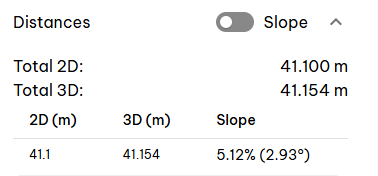
- Check the "Slope" option .
- Expand the submenu to display the slope details.
👉 The slope information appears:
- In the right side menu (detailed values)
- Directly in the viewer, near the measurement
4. Available slope information
Once the option is enabled, you can view the following:
- The slope as a percentage (%)
- The slope in degrees (°)
- The horizontal distance and actual distance (2D and 3D)
5. Overall slope display
Activating the "Slope" option on a measurement applies the slope calculation to all distance measurements in the GEO4X viewer.